
BUI for Ruby
A C extension gem (no FFI) that gives Ruby Blender's widgets, layouts, menus, trees and native windows, with block-built interfaces and headless rendering for tests.
- Ruby
The blenderui gem gives Ruby programs Blender’s interface: its widgets, its layout and the way they feel to use. It is a C extension (no FFI) over BUI’s kit, the C runtime that draws Blender’s widgets. You get native windows on Windows, Linux and macOS, and the same interface rendered without a window for tests and screenshots.
require "bui"
BUI.app do  window "Hello", width: 320, height: 120 do    count = 0    column padding: 8 do      shown = label "Clicked 0 times"      button("Click me") { shown.text = "Clicked #{count += 1} times" }    end  endend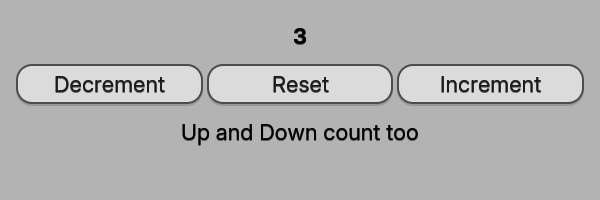
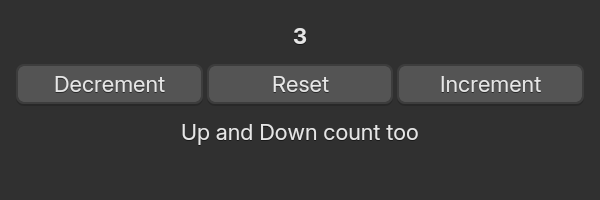
bindings/ruby/examples/counter.rb, rendered with --screenshot).Install it
The gem builds the kit from source, so it needs Ruby 3.1 or newer, CMake 3.20 or newer and a C and C++20 compiler. On Linux, install the X11 development headers too (libx11-dev on Debian and Ubuntu). On Windows, use RubyInstaller with its MSYS2 development kit.
The gem is not on RubyGems yet. Build it from a checkout of the repository:
cd bindings/rubybundle installrake compile # builds the kit and the extension into lib/bui/rake test # headless: no window neededruby -Ilib examples/counter.rbrake gem makes blenderui-<version>.gem with the kit’s sources inside, which gem install builds anywhere.
Nodes and properties
Everything on screen is a node: a layout ("column", "row", "frame"), a widget ("button", "slider", "text") or a view ("list", "tree", "canvas"). You make one by type name and set its properties by name:
size = BUI::Node.new("slider").set(label: "Size", min: 0, max: 10, value: 2.5)size[:enabled] = falsesize.num("value") # => 2.5A property takes a String, a number, true or false, a BUI::Color or a list of Strings (a drop-down’s items). A key the node doesn’t have raises ArgumentError, so a typo fails where you made it.
Nodes you make are yours until they join a tree. node.free frees a node and everything under it. A window made without a root: makes its own tree and frees it when you free the window.
Events
on(kind) { |event| ... } handles one kind of event. on_click, on_change and on_submit are short forms:
apply = BUI::Node.new("button").set(text: "Apply")apply.on_click { |e| puts "#{e.node.text} was clicked" }The block gets a BUI::Event with the node, the kind (:click, :change, :submit, :key…), two numbers that depend on the kind, and the text and keysym of a key. A handler may free the node it belongs to, as a “Delete” button removing its own row does.
An exception raised in a handler comes out of the call that ran it: ctx.click(...) in a test, or BUI.run in an app, which stops the loop first.
Windows and threads
BUI.run handles input and draws until the last window closes; BUI.app builds the windows in its block, runs, and frees them after. While the loop waits, other Ruby threads keep running.
The kit belongs to one thread, the one that runs the loop. From another thread, change a window with update:
Thread.new do loop do win.update { clock.text = Time.now.strftime("%H:%M:%S") } sleep 1 endendCtrl+C stops the loop and raises Interrupt as usual.
Without a window
A BUI::Context lays a tree out, takes input and renders into a BUI::Raster, with no window. Tests drive it like a user would:
require "minitest/autorun"require "bui"
class TestApply < Minitest::Test  def test_click    root = BUI::Node.new("column")    clicks = 0    button = BUI::Node.new("button").set(text: "Apply").on_click { clicks += 1 }    root << button    BUI::Context.open(root) do |ctx|      ctx.render(BUI::Raster.new(200, 60), full: true)      ctx.click(*button.rect.center)    end    assert_equal 1, clicks  ensure    root.free  endend
Raster#save_png writes the frame to a file, which is how the screenshot on this page was made.
What is there
| Part | In the gem |
|---|---|
| Nodes | Every node type, properties, children, the box from the last layout |
| Layout | Columns, rows, grids, and Tk’s pack, grid and place in a "frame" |
| Input | Click, press, release, motion, wheel, keys, key bindings, undo and redo |
| Menus | Menu buttons, menus and pie menus opened in place, with actions |
| Views | Trees (BUI::TreeItem), canvases, multi-line text areas |
| Images | PNG, JPEG, WebP, GIF, BMP, TGA, QOI, HDR, PNM and SVG on nodes and canvases |
| Look | Blender’s dark and light themes, theme files, the UI scale, Blender’s icons |
| Windows | Native windows, timers, frames, the window manager’s requests, the file browser dialog |
Not there yet: video, custom-drawn nodes, the animation engine and Dear ImGui. Ruby’s Ractors can’t use the gem: the kit has one thread.
Next steps
Last updated