
Vue on the desktop
Mount Vue 3 single-file components into native BUI windows with refs, v-model, slots, scoped styles, Tailwind classes and Blender's widgets, on Node.js or Bun.
- Vue 3.5
- JavaScript
Write Vue components as you would for the browser, and get a native desktop window instead. @blender-ui/vue mounts Vue 3 components into BUI: refs, v-model, v-if and v-for, slots, provide / inject, <script setup> and TypeScript work as they do on the web, BUI draws the result on the CPU or the GPU, and Blender’s widgets are one import away. No Electron, no webview.
It is a custom renderer: Vue’s own runtime and compiler do the work, and BUI is where the nodes go. Only the changes of each tick cross to BUI’s UI thread.
Install
npm install @blender-ui/vue vue# orbun add @blender-ui/vue vueIt brings @blender-ui/native with it. Vue 3.5 or newer is a peer dependency, and Node.js needs to be 22.15 or newer (Bun works too). The native addon is prebuilt for Windows x64, Linux x64 (glibc 2.35 or later) and macOS, where JavaScript runs headless; on other systems, build it from source.
Your first component
<script setup>import { ref } from 'vue'import { Button } from '@blender-ui/vue'const count = ref(0)</script>
<template> <main class="p-6 flex flex-col gap-3"> <span>Clicks: {{ count }}</span> <Button @click="count++">Add one</Button> </main></template>import { render } from '@blender-ui/vue'import Counter from './Counter.vue'
const { window } = render(Counter, { title: 'Counter', width: 360, height: 200, gpu: true })// the body is the page: `min-h-screen` makes its background fill the window, not only its contentwindow.body.className = 'm-0 min-h-screen bg-[#2b2b2b] text-[#e6e6e6]'The window’s body is the page. A background on a component’s root only paints that element’s box (the body has an 8 px margin by default), so put the page color on window.body, with m-0 min-h-screen to make it fill the whole window.
Run it:
node --import @blender-ui/vue/register app.js# orbun --preload @blender-ui/vue/register app.jsregister teaches the runtime .vue files: they import as components, compiled by Vue’s own compiler and cached in node_modules/.cache/@blender-ui/vue, so a cached start never loads the compiler. Every import 'vue' resolves to the one Vue this package uses, wherever the importing file is, and require('@blender-ui/vue') works as well as import. With Bun you can put the preload in bunfig.toml instead: preload = ["@blender-ui/vue/register"].
render, createApp and createRoot
render(component, options) opens a window and mounts the component into it. It returns { app, window, root, component }, where component is the root component’s instance.
| Option | What it does |
|---|---|
props |
The root component’s props |
title, width, height, resizable |
The window |
gpu |
Draw on the GPU (Direct3D 11 on Windows, OpenGL on Linux) |
slug |
GPU text from glyph outlines (default) or an atlas |
headless |
Render off-screen: tests and CI |
theme |
Blender’s 'dark' (default) or 'light' theme |
app |
Reuse an App you already made, to open several windows |
To install plugins first, make the app yourself and pass it to render:
import { createApp, render } from '@blender-ui/vue'
const app = createApp(Root).use(somePlugin, { option: 1 })render(app, { title: 'App', width: 800, height: 600 })
To mount into a window you opened yourself, use createRoot(window), then root.render(component) and root.unmount(). Closing the window unmounts its root (onUnmounted runs). Everything vue exports (ref, computed, h, nextTick …) is exported here too, so one import is enough.
Elements, events and v-model
Elements are HTML elements, as in the browser:
classtakes Tailwind classes, and:classobjects and arrays work.:styletakes strings and objects, andv-showworks.- Mouse, keyboard and form events work:
@click,@mousedown,@mouseup,@mousemove,@mouseenter,@mouseleave,@wheel,@keydown,@keyup,@inputand@change, with the modifiers.stop,.prevent,.self,.once,.enterand the other key and button ones. Events BUI doesn’t report (focus,blur,dblclick) never fire. v-modelworks on<input>(text, number, range, checkbox, radio),<textarea>,<select>and the Blender widgets. A checkbox can be bound to an array or aSet(and takestrue-value/false-value),:valuekeeps its type (a number stays a number), and number and range inputs give numbers.- Errors in event handlers go through Vue’s error handling (
onErrorCaptured, thenapp.config.errorHandler), not straight out of the event loop. - Blocks and components:
v-if,v-for(keyed too), slots (named ones too),provide/inject,defineProps,defineEmits,defineExpose, lifecycle hooks and<Teleport to="…">to an element work.
Blender’s widgets
Import Blender’s widgets as components. They’re always drawn and handled the Blender way: drag a number to change it, Ctrl to snap, and click to type a value or a sum such as 2*pi.
<script setup>import { ref } from 'vue'import { NumberSlider, TextField, Button } from '@blender-ui/vue'const size = ref(2.5)const name = ref('')</script>
<template>  <main class="p-4 flex flex-col gap-2">    <NumberSlider v-model="size" :min="0" :max="10" />    <TextField v-model.trim="name" />    <Button @click="console.log('apply', size, name)">Apply</Button>  </main></template>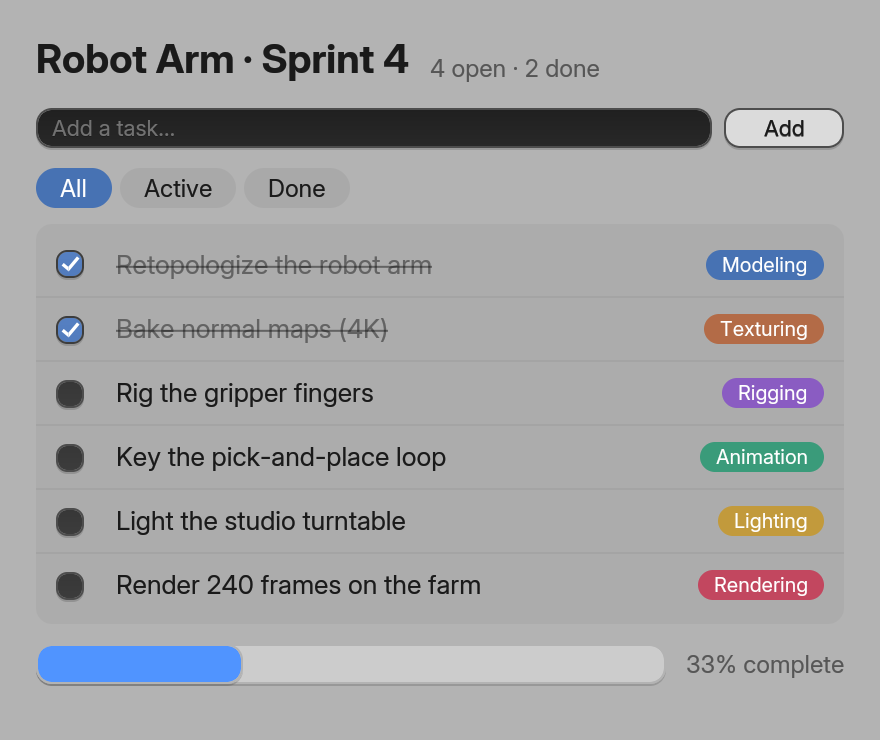
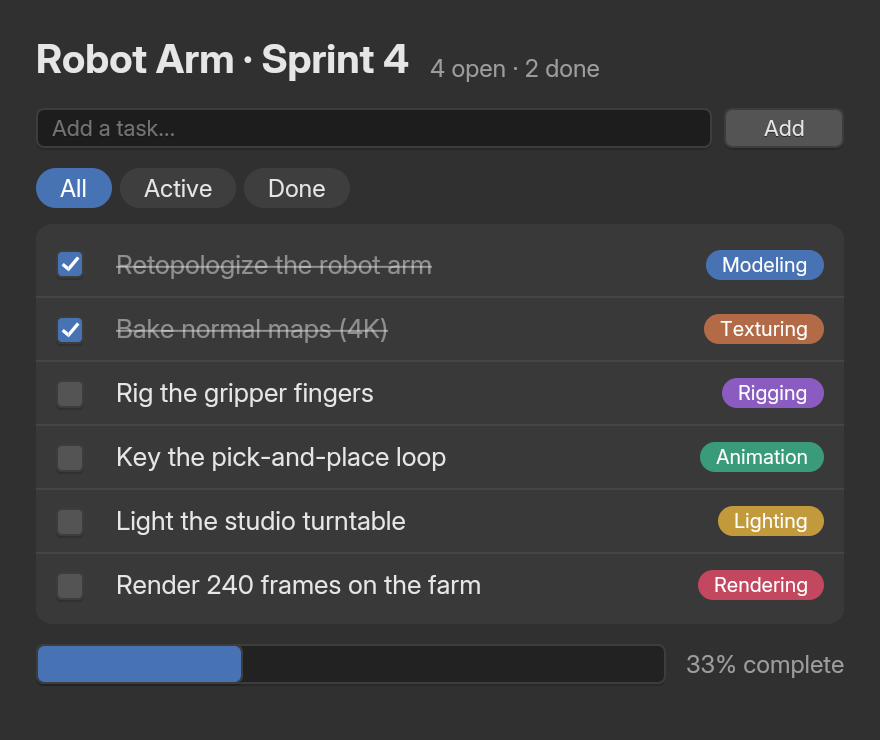
TextField, Button, Checkbox and ProgressBar, with v-model (examples/site/js/TodoVue.vue).The ten components are Button, Checkbox, Radio, NumberField, NumberSlider, TextField, TextArea, ColorSwatch, Dropdown and ProgressBar. Each is an HTML element underneath (NumberSlider is an <input type="range">), so it takes the same attributes and events. Their lowercase twins (<button>, <input>) look like a browser’s controls, except inside a styled element.
Styles
A component’s <style> and <style scoped> blocks work (plain CSS). Only <style scoped> is scoped, with a data-v-… attribute on the component’s elements; a plain <style> stays global and applies to every component in the window. BUI adds each stylesheet to a window once, however many instances show it. Tailwind classes and style attributes work everywhere, as in the other bindings.
Signals
Refs are the way to hold state in Vue. For state that lives outside components, @blender-ui/vue also exports BUI’s signals (signal, memo, batch, untrack, isSignal). A signal as the value of an attribute or a style binds it: a write updates that node straight away, without a render. (computed and effect stay Vue’s.)
What doesn’t work yet
<Transition>,<TransitionGroup>and<KeepAlive>’s animations: they need a browser’s CSS transitions and layout APIs.v-htmlandinnerHTML: build the content with elements.v-model.trim,.numberand.lazyon a plain<input>: Vue’s template compiler drops the modifiers there. They work on the Blender widgets, andtype="number"andtype="range"give numbers anyway.<style lang="scss">and the like: only CSS.v-bind()in<style>,<style module>,src="…"blocks and non-HTML templates are compile errors, not silently ignored.- TypeScript enums and namespaces on Node.js: it strips types only, as
node file.tsdoes. Use a const object instead of an enum, or run on Bun, which compiles all of TypeScript. <select multiple>.- Browser APIs (
window,localStorage,getComputedStyle) and libraries built on the DOM and CSS (Vuetify, Element Plus): not available. Libraries that are plain JavaScript on top of Vue, such as a store or a router in memory mode, don’t touch the DOM, but none is tested with BUI yet.
Standalone apps
bui build bundles .vue files too: the Vue package registers its bundler plugin with bui, so there’s nothing to configure.
npx bui build app.js # app.exe: BUI + QuickJS, one small filenpx bui build app.js --bun # app.exe: a Bun executablenpx bui run app.js # run on the QuickJS runtime, no buildSee standalone executables for the options.
Performance
The same scenes as the other bindings, measured in one session with React and Svelte alongside:
| 3,000 cells | FPS | RAM | JS heap | JavaScript per update |
|---|---|---|---|---|
| Node 26: React with state | 51.0 | 228 MB | 45 MB | 3.1 ms |
| Node 26: Svelte with runes | 54.9 | 115 MB | 22 MB | 50 µs |
| Node 26: Vue, state in the root component | 54.7 | 260 MB | 44 MB | 5.4 ms |
| Node 26: Vue, cell 0 a component of its own | 53.9 | 112 MB | 21 MB | 25 µs |
| Bun 1.4: React with state | 53.6 | 118 MB | 8 MB | 3.9 ms |
| Bun 1.4: Svelte with runes | 53.4 | 98 MB | 10 MB | 48 µs |
| Bun 1.4: Vue, state in the root component | 53.4 | 142 MB | 16 MB | 6.7 ms |
| Bun 1.4: Vue, cell 0 a component of its own | 56.0 | 107 MB | 11 MB | 27 µs |
This session's machine ran every variant at 49–56 FPS, so compare these rows with each other, not with the 2026-11-06 tables. With the state in the root component Vue re-runs the render function and compares the 3,000 cells, as React does; with the changing cell in a component of its own, only that component re-renders. Vue applies updates in a microtask, so JavaScript per update includes the nextTick hop. CPU per frame is left out: for Vue with state in the root on Bun it varied between runs (80%, 45% and 50% of a core, against a steady ~100% for the others). There is no signals row: a BUI signal binds an attribute or a style in a Vue template, not text.
| First frame | React | Vue | RAM at first frame (React / Vue) |
|---|---|---|---|
| QuickJS executable (bui build, 6.4 / 6.5 MB) | 43 ms | 66 ms | 14.5 / 17.5 MB |
| Bun executable (bui build --bun) | 46 ms | 77 ms | 29.9 / 40.3 MB |
| Bun (bun --preload …/register app.js) | 58 ms | 101 ms | 34.7 / 48.7 MB |
| Node.js (node --import …/register app.js) | 72 ms | 125 ms | 43.7 / 56.3 MB |
Vue's SFC compiler is most of its size, so register caches compiled components in node_modules/.cache/@blender-ui/vue, and a cached start never loads its SFC compiler (vue/compiler-sfc): before the cache Node.js took 209 ms and Bun 189 ms. The executables bundle compiled components and don't use the cache. The React and Vue columns ran one after the other, not interleaved.
- Put the part that changes in a component of its own. With the state in the root, Vue re-runs the render function and compares all 3,000 cells (5.4–6.7 ms per update, as React with state does). With the changing cell in its own component only that component re-renders: 25–27 µs.
- Compiled components are cached in
node_modules/.cache/@blender-ui/vue, and a cached start never loads Vue’s compiler: Node.js reaches its first frame in 125 ms and Bun in 101 ms (209 and 189 ms before the cache). Built withbui build, the app starts in 66 ms (QuickJS) or 77 ms (Bun).
The benchmarks page has the method and the full tables.
How it works
@blender-ui/vue calls Vue’s createRenderer with node operations over @blender-ui/native’s DOM-like tree. document makes detached nodes that join a window’s retained tree when they’re inserted into it, comments and empty text nodes act as anchors without taking any space, and nodes Vue drops are freed natively at the end of the tick.
Props reach an element one at a time. Attributes, style and removals go through the same applyProps as the React renderer; @click and friends become BUI events (a handler, or an array of them), and value and checked are set as properties so a typed value isn’t lost.
Templates are compiled by Vue’s own compiler with two changes. v-model uses the core transform, which gives an element modelValue and onUpdate:modelValue props, because the DOM’s vModelText and friends need a browser. Static hoisting into HTML strings is off, because there is no HTML parser to insert it with.
Next steps
Last updated