
Data tables
A virtualized DataTable with the API of gpui-component's, drawn the way Blender draws its spreadsheet editor, plus a uniform_list for long lists. A million rows scroll in about a millisecond.
- Rust
A table of a million rows is easy to ask for and hard to build: make one element per cell and the window stops responding. DataTable draws only the cells you can see, straight to the screen, the way Blender’s spreadsheet editor does. Scrolling it costs about a millisecond, whether it holds a hundred rows or a million.
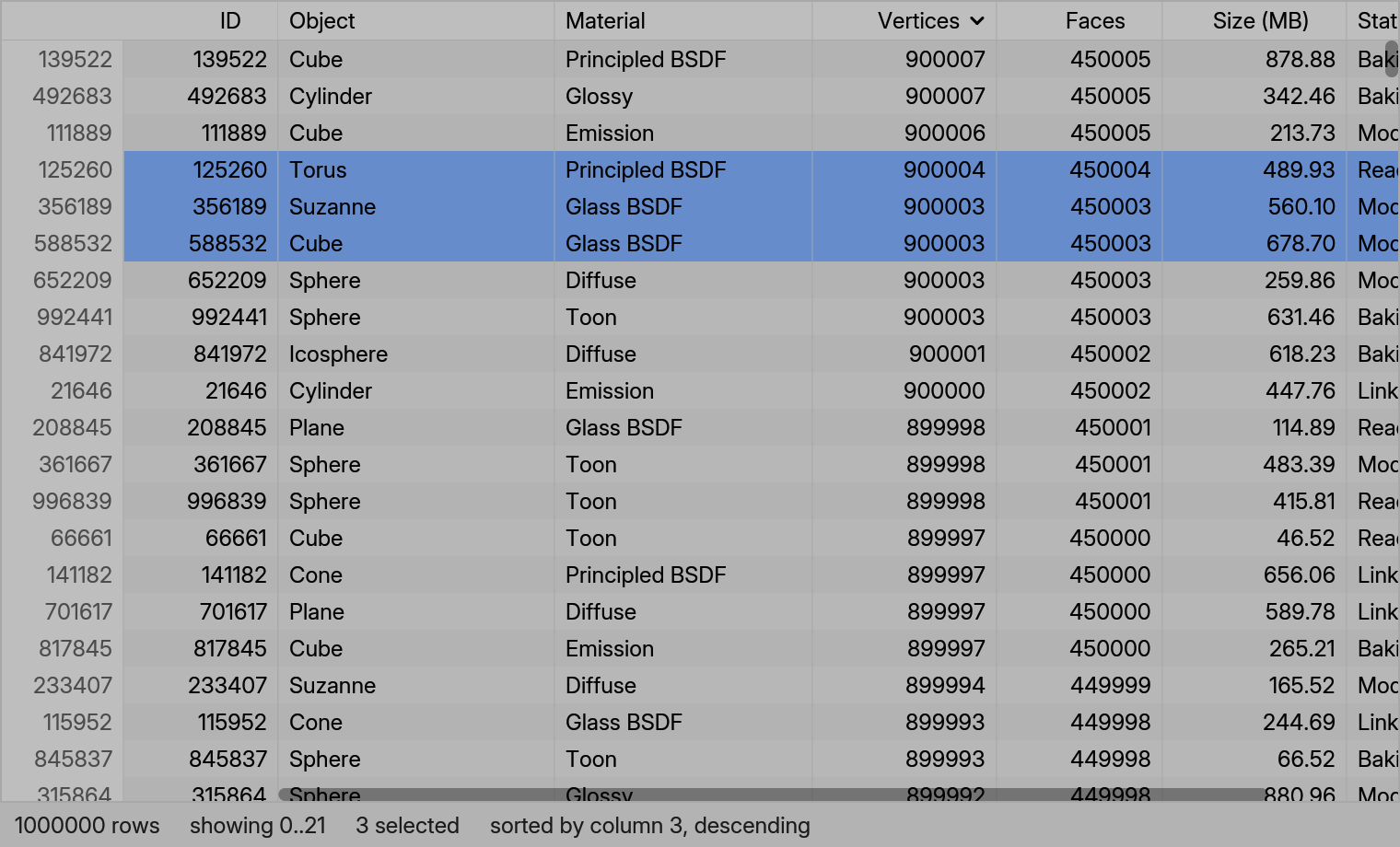
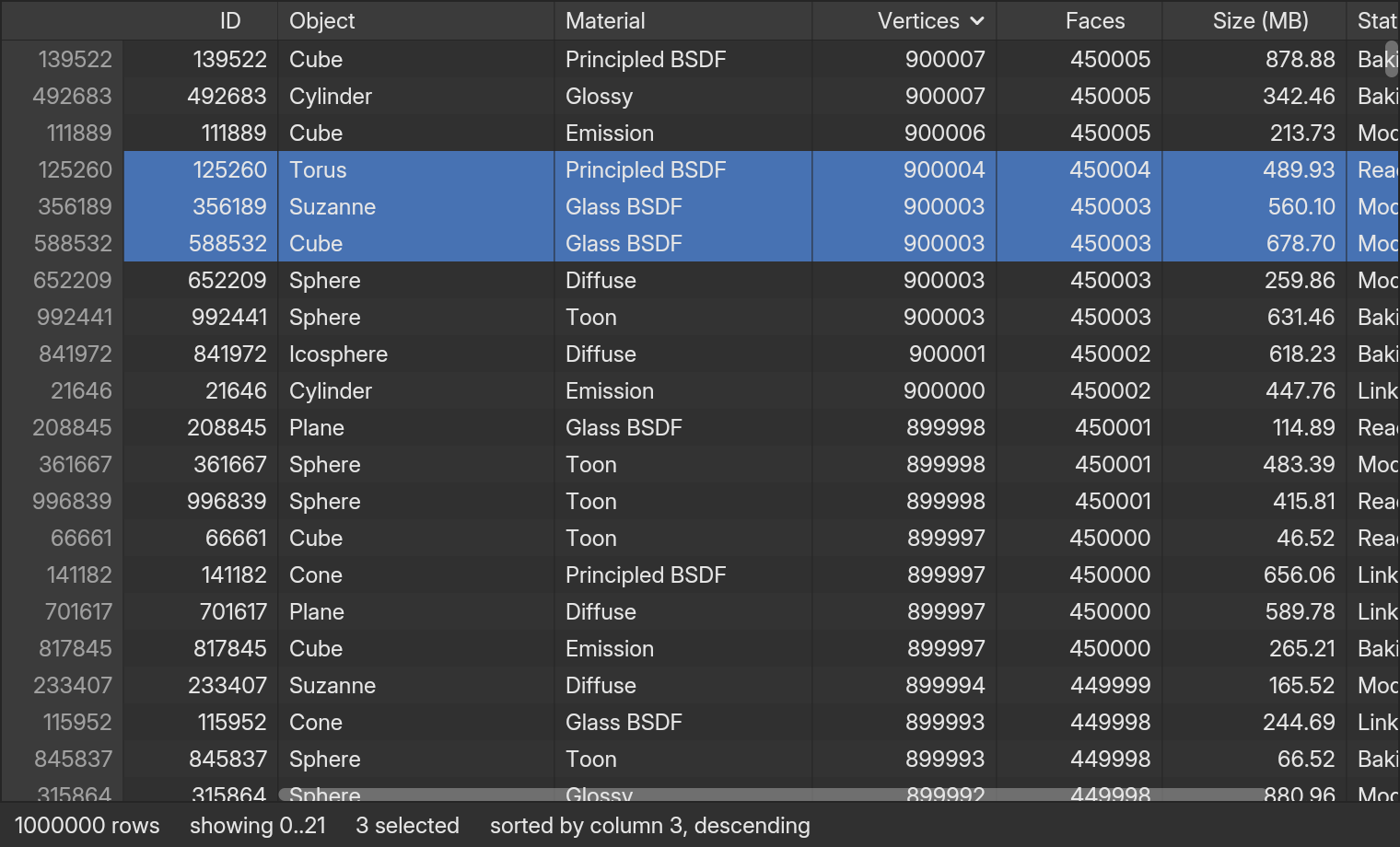
examples/site_data_table.rs).A table in 30 lines
You describe your data with a delegate (what the columns are, and the text of any cell), keep the table’s state in an entity, and put a DataTable in your view:
use blenderui::prelude::*;use blenderui::table::{Cell, CellSource, Column, DataTable, TableDelegate, TableState};
struct People;
// The cells: called for the cells in view only. Numbers are typed; the table// formats them without allocating.impl CellSource for People {    fn cell(&self, row: usize, col: usize) -> Cell<'_> {        Cell::U64(if col == 0 { row as u64 } else { row as u64 * 7 % 1000 })    }}
impl TableDelegate for People {    fn columns_count(&self, _: &App) -> usize { 2 }    fn rows_count(&self, _: &App) -> usize { 1_000_000 }    fn column(&self, ix: usize, _: &App) -> Column {        if ix == 0 { Column::new("id", "ID").sortable().width(px(80.0)).fixed_left() }        else { Column::new("score", "Score").sortable() }    }}
struct App1 { table: Entity<TableState<People>> }
impl Render for App1 {    fn render(&mut self, _: &mut Window, _: &mut Context<Self>) -> impl IntoElement {        rsx! {            <div class="w-full h-full">                {DataTable::new(&self.table).stripe(true)}            </div>        }    }}
use blenderui::prelude::*;use blenderui::table::{Cell, CellSource, Column, DataTable, TableDelegate, TableState};
struct People;
impl CellSource for People { fn cell(&self, row: usize, col: usize) -> Cell<'_> { Cell::U64(if col == 0 { row as u64 } else { row as u64 * 7 % 1000 }) }}
impl TableDelegate for People { fn columns_count(&self, _: &App) -> usize { 2 } fn rows_count(&self, _: &App) -> usize { 1_000_000 } fn column(&self, ix: usize, _: &App) -> Column { if ix == 0 { Column::new("id", "ID").sortable().width(px(80.0)).fixed_left() } else { Column::new("score", "Score").sortable() } }}
struct App1 { table: Entity<TableState<People>> }
impl Render for App1 { fn render(&mut self, _: &mut Window, _: &mut Context<Self>) -> impl IntoElement { div().size_full().child(DataTable::new(&self.table).stripe(true)) }}
// when opening the window:// cx.new(|cx| App1 { table: cx.new(|cx| TableState::new(People, window, cx)) })Column sets the width, whether it sorts, resizes, moves or is pinned, and how its text is aligned. A click on a sortable header sorts ascending, then descending, then back to the original order. Drag a header’s right edge to resize it (double-click it to fit the content when your delegate implements fit_column), and drag a header sideways to move the column.
Why it is fast
Blender’s spreadsheet doesn’t make a widget per cell. Each frame it works out which rows the scroll position shows (first_row = scroll_y / row_height, and region_height / row_height + 1 of them), skips the columns that are off screen, and draws just those cells. BUI’s table does the same:
- Only visible cells are asked for.
CellSource::cellruns for the cells in view, never for the rest. The table has no per-row state, so building one costs nothing. - Cells are painted, not built. There’s no element, style or layout box per cell, so a frame builds the same handful of elements however many rows there are.
- Sorting and filtering never copy rows. They produce a list of row numbers (what Blender calls an index mask) and the table reads through it. A column of numbers or of text sorts through typed keys: one pass pulls an order-preserving integer out of each cell, then plain integer pairs are sorted on every core, with no call into your code per comparison.
- A steady frame allocates nothing.
cellhands back a borrowed&stror a number that the table formats into a stack buffer, and the table’s own drawing is covered by a test that counts allocations. - Nothing moves, nothing renders. A table that isn’t scrolling costs no CPU.
Rust data table: scroll frame, 1,000,000 rows x 20 columns
Whole frame, 900x500 window, software raster. One element per cell: 2,000 rows
Lower is better
1.1 msper scrolled frame at a million rows
- BUI
- Others
- DataTablepainted like Blender's spreadsheet1.1 ms
- uniform_list20 cell elements per visible row3.1 ms
- One element per cell2,000 rows only1,735 ms1577× more
Open benchClose bench
| DataTable (painted) | uniform_list rows | One element per cell | |
|---|---|---|---|
| Rows measured | 1,000,000 | 1,000,000 | 2,000 |
| Build | 0.17 ms | - | - |
| First frame | 6-8 ms | 13 ms | 2,800 ms |
| Scroll frame | 1.1 ms | 3.1 ms | 1,735 ms |
| Heap allocations per frame (whole pipeline) | 48 | 5,186 | 780,467 |
| Allocations in the table's own drawing | 0 | - | - |
| Memory added (working set) | 17 MB | 19 MB | 138 MB |
| Sort 1,000,000 rows by a column (header click, includes the repaint) | 22 ms | - | - |
Frame times are the whole pipeline: render, layout, paint and the software raster. One element per cell was measured at 2,000 rows (a million would need about 70 GB and over ten minutes per frame; its cost grows linearly with rows). Allocation counts come from a counting global allocator; the table's drawing allocates nothing in steady state (a unit test asserts it). The same table on real gpui against gpui-component is in the next chart.
Source: bindings/rust/blenderui/examples/bench_table.rs · Ryzen 7 5800U laptop, Windows 11, on AC power
The same 1,000,000 x 20 table, three ways, measured by examples/bench_table.rs (a 900x500 window; “frame” is the whole pipeline including the software raster). The last bar is a table built the obvious way, one element per cell, measured at 2,000 rows because it can’t be measured at a million.
One core, two frameworks
The table is split so that nothing is written twice. The blenderui-table crate has no dependencies and no framework: the visible-row math, column culling, the row index mask and the typed sorts, the selection model, keyboard navigation, column layout, Ctrl+C text, scrolling, hit testing, a bounded text-run cache, and the painting itself, which draws through a small PaintSink trait. A framework adapter adds three things and no logic: a Host that forwards your delegate’s hooks and the redraw calls, a PaintSink that draws rectangles and text, and an element that hands pointer, wheel and key events to the core.
blenderui’s own table module and the gpui adapter below are both such adapters, around the same TableCore.
On gpui
blenderui-table-gpui is a DataTable for plain gpui with gpui-component’s names (TableDelegate, Column, ColumnSort, ColumnGroup, TableState, TableEvent, scroll_to_row, load_more …). It is a custom gpui Element that paints the visible cells with Window::paint_quad and shaped lines: two elements per frame, however many rows. It keeps shaped text in a cache keyed by text, color and size, so scrolling never reshapes a string it showed a frame ago.
use blenderui_table_gpui::*;
struct People;
impl CellSource for People {    fn cell(&self, row: usize, col: usize) -> Cell<'_> {        match col {            0 => Cell::U64(row as u64),            1 => Cell::Str(["Cube", "Sphere", "Torus"][row % 3]),            _ => Cell::F64(row as f64 / 8.0, 2),        }    }}
impl TableDelegate for People {    fn columns_count(&self, _: &App) -> usize { 3 }    fn rows_count(&self, _: &App) -> usize { 1_000_000 }    fn column(&self, ix: usize, _: &App) -> Column {        Column::new(format!("c{ix}"), ["ID", "Name", "Size"][ix]).sortable().width(px(110.0))    }}
// in render: div().size_full().child(DataTable::new(&self.table).stripe(true))
For a cell that needs real content, return true from has_custom_cells and is_custom_cell(row, col), return Cell::Empty from cell, and build the element in render_td; only visible custom cells are built.
Against gpui-component
Measured in a real window on the same gpui, with the same data, columns and row height, one process per library:
gpui: scroll frame, 1,000,000 rows x 20 columns
Main thread, render to end of paint, median of 3 runs, real window
Lower is better
3.3xless CPU per scrolled frame than gpui-component
- BUI
- Others
- blenderui-table-gpuipaints visible cells1.45 ms
- gpui-component 0.9.0an element per cell4.75 ms3.3× more
- Empty windowthe framework alone0.15 ms
Open benchClose bench
| blenderui-table-gpui | gpui-component 0.9.0 | Empty window (no table) | |
|---|---|---|---|
| Scroll frame, render to end of paint, median | 1.45 ms | 4.75 ms | 0.15 ms |
| Scroll frame, 95th / 99th percentile | 1.77 / 2.11 ms | 8.99 / 9.58 ms | 0.26 / 0.30 ms |
| Frames per second under continuous scrolling | 60.1 | 60.0 | 60.1 |
| Process CPU per frame (all threads) | 4.6 ms | 8.9 ms | 1.0 ms |
| Heap allocations per scrolled frame | 259 | 7,623 | 102 |
| Heap allocations per repainted frame (no scroll) | 136 | 7,416 | 102 |
| Selection (click) to painted, CPU | 1.05 ms | 5.27 ms | - |
| Keyboard (Down) to painted, CPU | 1.63 ms | 8.85 ms | - |
| Sort 1,000,000 rows by a number | 37 ms | 140 ms | - |
| Sort 1,000,000 rows by text | 38 ms | 57 ms | - |
| First frame (window creation dominates) | 431 ms | 445 ms | 438 ms |
| Memory above the data and the empty runtime | 42 MB | 42 MB | - |
| Peak working set | 231 MB | 192 MB | - |
| 100,000 x 8: scroll frame median | 1.24 ms | 4.02 ms | - |
| 100,000 x 8: sort by a number / by text | 4.2 / 6.8 ms | 8.6 / 3.9 ms | - |
Ryzen 7 5800U laptop (8 cores), 15 GB, Windows 11; the GPU is whatever gpui picks on the default Direct3D 11 adapter. One process per library, median of 3 runs. Frame time is the main thread from the start of the root view's render to the end of the table's paint (elements, layout, prepaint, paint); GPU submission and the 60 Hz vsync wait are not in it, so both libraries show 60 FPS and the difference is CPU time. Scrolling is two rows per frame, driven the same way for both. Allocations come from a counting global allocator on the UI thread. Select and key inject real events through Window::dispatch_event and count the dispatch plus the next frame. Both tables hold the same data (columnar, generated once) and the same 110 px columns and 32 px rows; the component sorts its own row index with sort_by in perform_sort, as its examples sort their data, while this crate sorts a row mask with typed keys on every core. At 100,000 rows the component's plain single-threaded sort wins on text. This crate's peak memory is higher because sorting builds key pairs. Not measured: GPU time, a different GPU, other platforms.
Source: bindings/rust/blenderui-table-gpui/bench/results.md · Ryzen 7 5800U laptop, Windows 11, on AC power
The frame time is the main thread’s CPU time from render to the end of paint; it leaves out GPU work and the 60 Hz wait, which is why both show 60 FPS. The gaps are the point: about 3.3 times less time per scrolled frame, about 30 times fewer allocations, and a worse tail for the component (95th percentile 9 ms against 1.8 ms). The component’s own text sort wins at 100,000 rows of text; ours wins on numbers there and on every sort at a million rows. Peak memory is higher here because sorting builds key pairs. Reproduce it with cargo build --release --features bench --example bench_gpui -j 1 and node bench/run.mjs in bindings/rust/blenderui-table-gpui. GPU time and other machines are not measured.
What you get
| Feature | How |
|---|---|
| Sticky header, pinned columns, horizontal and vertical scrolling | built in; Column::fixed_left() pins a column |
| Column resize, move, sort | drag a header border, drag a header, click a header |
| Row selection | click; Ctrl-click toggles; Shift-click extends; Ctrl+A selects all |
| Cell and column selection | cell_selectable(true), col_selectable(true) (one at a time) |
| Keyboard | Up, Down, Page Up, Page Down, Home, End; Left and Right in cell and column modes; Escape clears |
| Copy | Ctrl+C puts the selected rows on the clipboard as tab-separated text |
| Stripes, row-number column, borders | stripe(true), row_header(true), bordered(true) |
| Row sizes | Size::XSmall to Size::Large, from Blender’s UI_UNIT_Y and the UI scale |
| Loading and empty states | loading() shows a skeleton; empty_text() |
| More rows when scrolled to the end | has_more, load_more_threshold, load_more |
| Filter | `TableState::set_filter( |
| Themes | Blender’s dark and light themes, with HiDPI |
Events come as TableEvent values, the same names gpui-component uses (SelectRow, DoubleClickedRow, ColumnWidthsChanged, MoveColumn, RightClickedRow …). Listen with on_event, or with on_select, on_sort, on_row_double_click, on_column_resize and on_context_menu:
DataTable::new(&table) .stripe(true) .on_select(|row, _window, _cx| println!("row {row}")) .on_sort(|col, sort, _, _| println!("column {col}: {sort:?}"))Porting from gpui-component
The names follow gpui-component’s TableDelegate, Column, ColumnSort, ColumnGroup, TableState and DataTable: columns_count, rows_count, column, perform_sort, fit_column, move_column, group_headers, loading, has_more, load_more, visible_rows_changed, visible_columns_changed, selected_row, set_selected_row, visible_range, scroll_to_row, scroll_to_col, headers and dump. Two things differ on purpose:
- Cells are values drawn by the table. gpui-component’s
render_tdreturns an element for every visible cell on every frame; herecellreturns a typed value (Cell::U64,Cell::Str,Cell::F64(value, decimals)) and the table draws it, which is what makes a frame cost the same at any size. On gpui,render_tdremains as an opt-in for the few cells that need real elements. In blenderui, cells that hold widgets aren’t supported yet. - The table sorts for you. The cells’ own order sorts an index list (override
CellSource::sort_kindandcomparefor a custom order); the delegate’s data is never reordered. If you’d rather sort your own data inperform_sort, returnfalsefromsort_by_mask.
Row numbers in events and in selected_row are your delegate’s row numbers, so they stay right when the table is sorted or filtered.
Long lists: uniform_list
For a list of equal-height items that are real elements (buttons, icons, rows with their own widgets), uniform_list takes gpui’s signature and builds only the items in view:
uniform_list("files", 100_000, |range, _window, _cx| { range.map(|i| div().child(format!("File {i}"))).collect::<Vec<_>>()}).item_height(px(20.0)).h(px(300.0))It uses the same visible-range code as the table. The scroll offset is kept per id like any scrolling element, and the scrollbar is sized for all the items. Layout works in f32, so past about 16 million pixels of total height (a million 24 px rows) the position loses sub-pixel precision; the DataTable keeps its own offset in f64 and has no such limit.
Testing a table
Tables run off-screen like everything else, so your tests can click headers, drag borders and press keys. tests/table.rs does exactly that, on a million-row table; see headless testing.
Limitations
- No element cells in blenderui yet (the gpui adapter has the
render_tdescape hatch), and no popup context menu: right clicks arrive asTableEvent::RightClickedRow. - Selection after a sort or filter is cleared, because selected rows are display positions.
- Cell and column selection hold one cell or column, not a range. Row selection takes ranges.
- Column groups (
group_headers) draw, but aren’t covered by a test yet. - JavaScript and Python wrappers: coming soon. The table is built once, in Rust; the other languages will wrap it rather than reimplement it.
- Damage rectangles inside the table aren’t reported. A scroll or hover redraws the table’s canvas as a whole; the engine’s damage rendering for the rest of the window is unchanged.
Last updated