
Svelte on the desktop
Mount Svelte 5 components into native BUI windows with runes, snippets, Tailwind classes and Blender's widgets, on Node.js or Bun.
- Svelte 5.57
- JavaScript
Write Svelte components as you would for the browser, and get a native desktop window instead. @blender-ui/svelte mounts Svelte 5 components into BUI: runes, snippets, bindings, transitions and {#each} blocks work as they do on the web, BUI draws the result on the CPU or the GPU, and Blender’s widgets are one import away. No Electron, no webview.
Svelte is already fine-grained: a $state change updates the one node that shows it, and that’s what BUI sends to its UI thread. Your component code is plain Svelte.
Install
npm install @blender-ui/svelte svelte# orbun add @blender-ui/svelte svelteIt brings @blender-ui/native with it. Svelte 5.57 or newer is a peer dependency, and Node.js needs to be 22.15 or newer (Bun works too). The native addon is prebuilt for Windows x64; on Linux, build it from source.
Your first component
<script>  import { Button } from '@blender-ui/svelte'  let count = $state(0)</script>
<main class="p-6 flex flex-col gap-3 bg-[#2b2b2b] text-[#e6e6e6]"> <span>Clicks: {count}</span> <Button onclick={() => count++}>Add one</Button></main>import { render } from '@blender-ui/svelte'import Counter from './Counter.svelte'
render(Counter, { title: 'Counter', width: 360, height: 200, gpu: true })Run it:
node --import @blender-ui/svelte/register app.js# orbun --preload @blender-ui/svelte/register app.jsregister teaches the runtime two things: .svelte files (and .svelte.js rune modules) import as compiled components, and svelte resolves to its browser build. Both are cached in node_modules/.cache/@blender-ui/svelte: compiled components, so later starts skip Svelte’s compiler, and, when Bun is installed, Svelte’s runtime bundled into a few modules on the first run, so it loads like one. With Bun you can put the preload in bunfig.toml instead: preload = ["@blender-ui/svelte/register"].
render and createRoot
render(Component, options) opens a window and mounts the component into it. It returns { app, window, root, component }, where component holds the component’s exports.
| Option | What it does |
|---|---|
props |
The component’s props |
context |
A Map of context for the component tree, as in Svelte’s mount |
title, width, height, resizable |
The window |
gpu |
Draw on the GPU (Direct3D 11 on Windows, OpenGL on Linux) |
slug |
GPU text from glyph outlines (default) or an atlas |
headless |
Render off-screen: tests and CI |
theme |
Blender’s 'dark' (default) or 'light' theme |
app |
Reuse an App you already made, to open several windows |
window is a @blender-ui/native window, so you can style its body directly:
const { window } = render(Counter, { title: 'BUI + Svelte', width: 420, height: 260 })window.body.setAttribute('styled', '') // Blender's look for every elementwindow.body.className = 'm-0 bg-[#2b2b2b] text-[#e6e6e6]'To mount into a window you opened yourself, use createRoot(window), then root.render(Component, { props }) and root.unmount(). Closing the window unmounts its root (onDestroy runs). For tests, act(fn) runs fn and applies Svelte’s pending updates at once (flushSync).
Elements, events and bindings
Elements are HTML elements, as in the browser:
classtakes Tailwind classes, andclass={{ on: active }}objects and arrays work.styletakes a string;style:color={c}directives work.- Mouse, keyboard and form events work:
onclick,onmousedown,onmouseup,onmousemove,onmouseenter,onmouseleave,onwheel,onkeydown,onkeyup,oninputandonchange. They bubble, andstopPropagationworks. Svelte delegates most of them to the window’s body, as on the web. - Bindings:
bind:value,bind:checked,bind:groupandbind:thiswork. - Blocks:
{#if},{#each}(keyed too),{#await},{#key}and snippets with{@render}work, and so do context,onMountandonDestroy. - Transitions (
transition:,in:,out:) run their start and end, without animating in between, for now: an outro removes its element at once.
Blender’s widgets
Import Blender’s widgets as components. They’re always drawn and handled the Blender way: drag a number to change it, Ctrl to snap, and click to type a value or a sum such as 2*pi.
<script>  import { NumberSlider, Button } from '@blender-ui/svelte'  let size = $state(2.5)</script>
<main class="p-4 flex flex-col gap-2">  <NumberSlider min={0} max={10} value={size} oninput={(e) => (size = Number(e.target.value))} />  <Button onclick={() => console.log('apply', size)}>Apply</Button></main>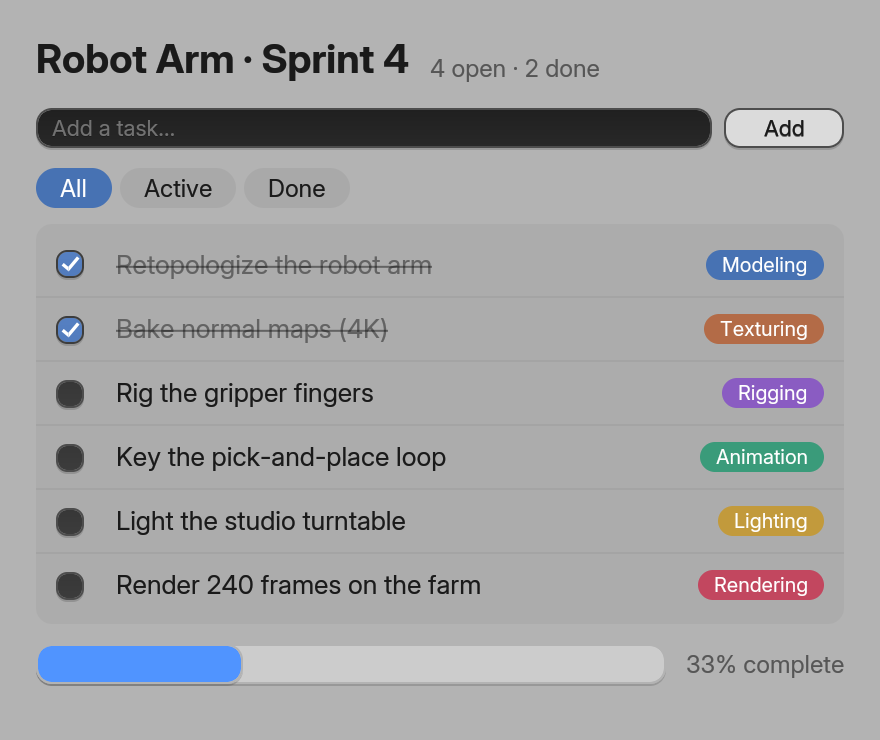
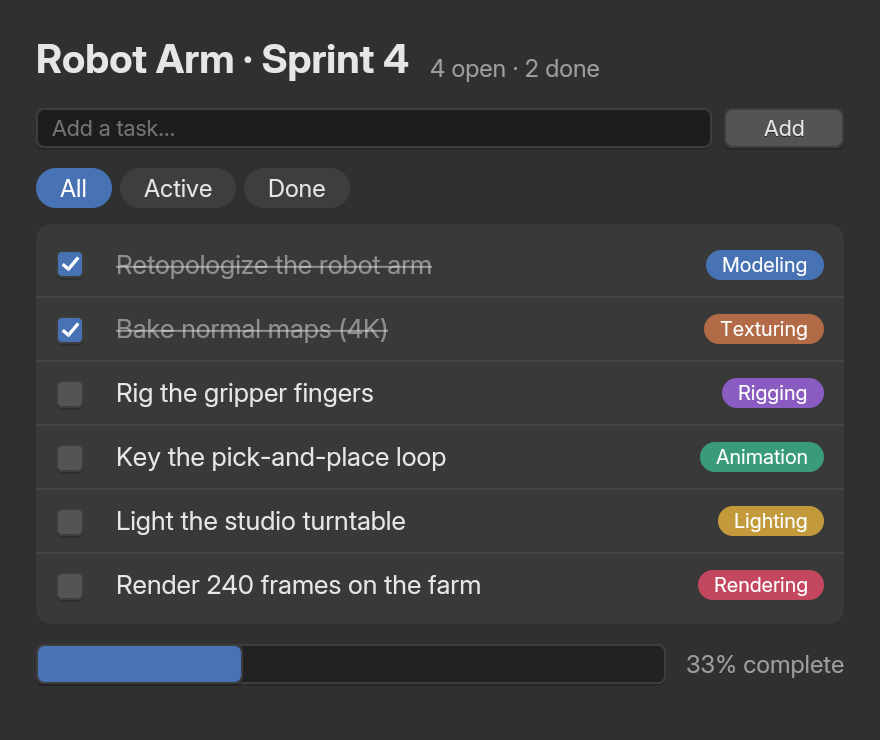
TextField, Button, Checkbox and ProgressBar (examples/site/js/TodoSvelte.svelte).The ten components are Button, Checkbox, Radio, NumberField, NumberSlider, TextField, TextArea, ColorSwatch, Dropdown and ProgressBar. Each is an HTML element underneath (NumberSlider is an <input type="range">), so it takes the same attributes and events. Their lowercase twins (<button>, <input>) look like a browser’s controls, except inside a styled element.
Styles
A component’s <style> block works: Svelte scopes it to the component, and BUI adds each component’s stylesheet to a window once, however many instances it shows. Tailwind classes and style attributes work everywhere, as in the other bindings.
Signals
Runes are the way to hold state in Svelte, and they’re already fine-grained. For state that lives outside components, @blender-ui/svelte exports BUI’s signals (signal, computed, effect, batch, untrack, createSignal, ref). You can use one two ways:
- As a value (
{label},style={style},class={cls},title={label}): the node is bound to the signal. A write updates that node straight away, without Svelte running at all, which is the cheapest update there is. - As a store (
$count): the component follows it like any other Svelte state, so you can compute with it ({$selection.length} selected).
<script>  import { selection, status } from './store.js' // signal([]), signal('Ready')</script>
<span>{status}</span><p>{$selection.length} selected</p>
Standalone apps
bui build bundles .svelte files too: the Svelte package registers its bundler plugin with bui, so there’s nothing to configure.
npx bui build app.js # app.exe: BUI + QuickJS, one small filenpx bui build app.js --bun # app.exe: a Bun executablenpx bui run app.js # run on the QuickJS runtime, no buildSee standalone executables for the options.
Performance
The same scenes from Svelte and from the React binding, measured in one session:
React vs Svelte: JavaScript per update, 3,000 cells
One cell changes; the framework applies it and sends it to the UI thread; median of 3 sessions of 500
Lower is better
- Plain JS
- React + signals
- Svelte + signals
- Svelte (runes)
- Node 26
- Plain JS: 14.1 µs
- React + signals: 23.3 µs
- Svelte + signals: 16.8 µs
- Svelte (runes): 65.3 µs
- Bun 1.4
- Plain JS: 12.6 µs
- React + signals: 17 µs
- Svelte + signals: 19 µs
- Svelte (runes): 75.7 µs
- QuickJS
- Plain JS: 28.1 µs
- React + signals: 40.2 µs
- Svelte + signals: 35.6 µs
- Svelte (runes): 790 µs
Open benchClose bench
| 3,000 cells | CPU per frame | RAM | JS heap | JavaScript per update |
|---|---|---|---|---|
| Node 26: plain JS | 37.0 ms | 92 MB | 7.6 MB | 14 µs |
| Node 26: React with signals / with state | 37.6 / 38.1 ms | 100 / 166 MB | 12.4 / 19.4 MB | 23 µs / 5.2 ms |
| Node 26: Svelte with signals / runes | 39.0 / 39.4 ms | 116 / 117 MB | 20.6 / 24.8 MB | 17 / 65 µs |
| Bun 1.4: plain JS | 37.4 ms | 81 MB | 2.7 MB | 13 µs |
| Bun 1.4: React with signals / with state | 38.4 ms / (see note) | 87 / 111 MB | 6.1 / 11.7 MB | 17 µs / 8.6 ms |
| Bun 1.4: Svelte with signals / runes | 36.8 / 35.9 ms | 97 / 98 MB | 10.3 / 10.2 MB | 19 / 76 µs |
| QuickJS: plain JS | 38.6 ms | 59 MB | 28 µs | |
| QuickJS: React with signals / with state | 37.8 ms / (see note) | 60 MB | 40 µs / 76 ms | |
| QuickJS: Svelte with signals / runes | 38.5 / 37.0 ms | 75 / 75 MB | 36 / 790 µs |
Every variant ran at 26–29 FPS in this session (the machine, not the code), so CPU per frame is mostly BUI's own rendering and differs within noise; the last column is the JavaScript cost of one update alone (500 back to back, each applied and sent to the UI thread). Svelte with signals passes BUI signals as values, which bind their nodes: writes skip Svelte, as React's signal props skip React. Svelte with runes pays Svelte's own flush, which walks the component's effects (3,000 here). React with state on Bun and QuickJS: its 500 back-to-back re-renders (8.6 and 76 ms each) overran the warm-up, so its frame numbers from this session aren't valid.
Source: docs/javascript.md#performance · Ryzen 7 5800U laptop, Windows 11, on AC power
| First frame | React | Svelte | Svelte before | RAM at first frame (React / Svelte) |
|---|---|---|---|---|
| QuickJS executable (bui build, 6.9 MB either way) | 93 ms | 89 ms | 81 ms | 20.4 / 20.4 MB |
| Bun executable (bui build --bun) | 106 ms | 90 ms | 94 ms | 37.8 / 38.8 MB |
| Bun (bun --preload …/register app.js) | 107 ms | 121 ms | 203 ms | 36.5 / 40.2 MB |
| Node.js (node --import …/register app.js) | 125 ms | 135 ms | 393 ms | 52.1 / 55.4 MB |
On Node.js and Bun, register now serves Svelte's runtime bundled (once, with Bun, into node_modules/.cache) and compiled components from the cache; before, Svelte's runtime loaded from about 90 source modules. The React and Svelte columns ran one after the other, not interleaved. Bun sometimes crashes when a React app quits (after its first frame; 5 of 12 launches here, 11 of 12 for the Bun executable), a bug that predates this work; those launches count for first frame but not for exit time.
- Signals as values are the cheapest update: the node is bound to the signal, so a write skips Svelte.
- Runes go through Svelte’s flush, which visits the component’s effects; with thousands of rows that’s tens of microseconds per update on Node.js and Bun.
- Built with
bui build, a Svelte app reaches its first frame in under 100 ms. On Node.js and Bun,registerserves Svelte’s runtime bundled, so a start costs little more.
The benchmarks page has the method and the full table.
How it works
Svelte has no custom-renderer API: a compiled component calls the DOM directly (createElement, cloneNode, insertBefore, addEventListener …). @blender-ui/native provides that DOM, and the few functions Svelte’s templates call on every update (text, attributes, class, style) write straight into BUI’s nodes. document makes detached nodes that join a window’s retained tree when they’re inserted into it, comments and empty text nodes act as anchors without taking any space, and only the changes of each tick cross to BUI’s UI thread. Nodes Svelte drops are freed natively at the end of the tick.
Components are compiled with fragments: 'tree', so templates are built with createElement rather than an HTML parser.
Next steps
Last updated