
shadcn Data Table
The API of shadcn/ui's Data Table (TanStack Table's columns, state and row models) on the painted table, in rsx! and builder syntax. Sorting, filtering, pagination, row selection and column visibility over a million rows, with typed cells instead of JSX.
- Rust
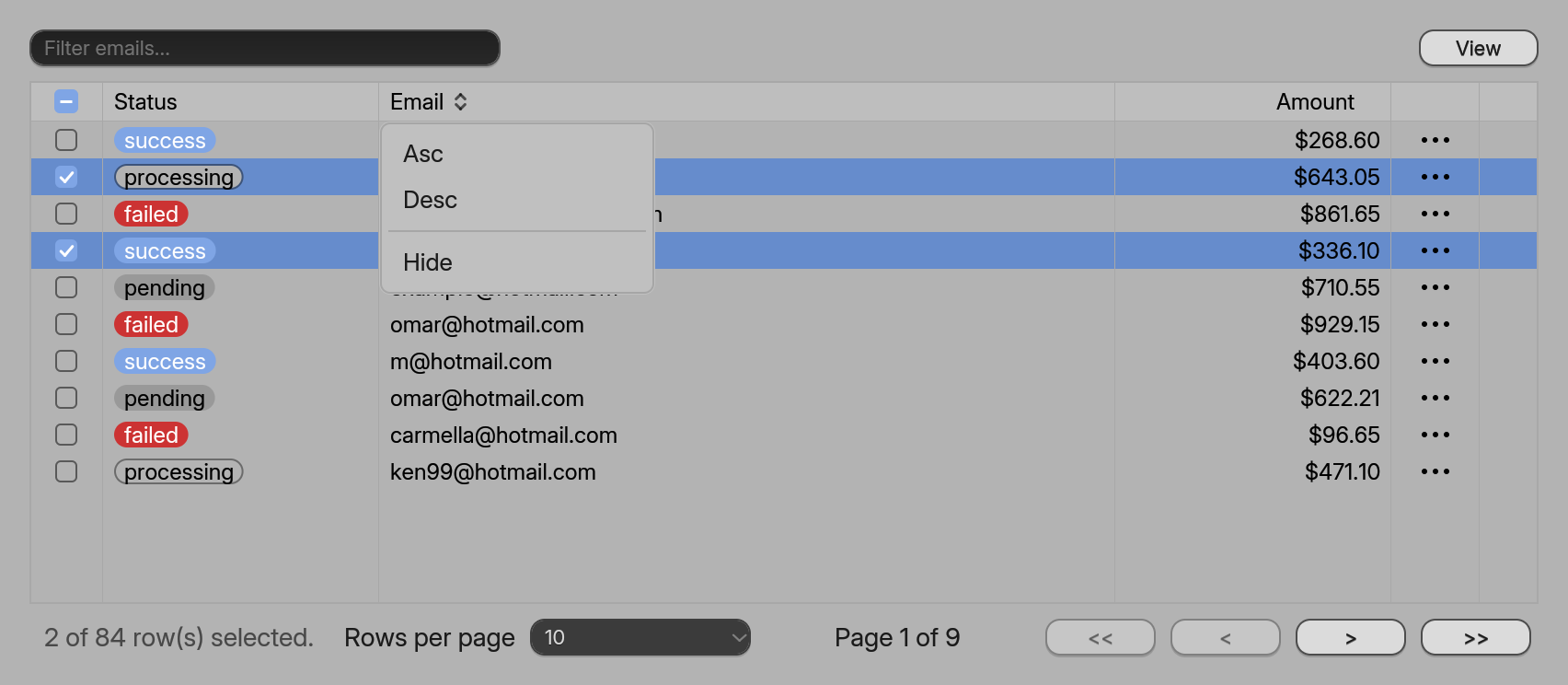
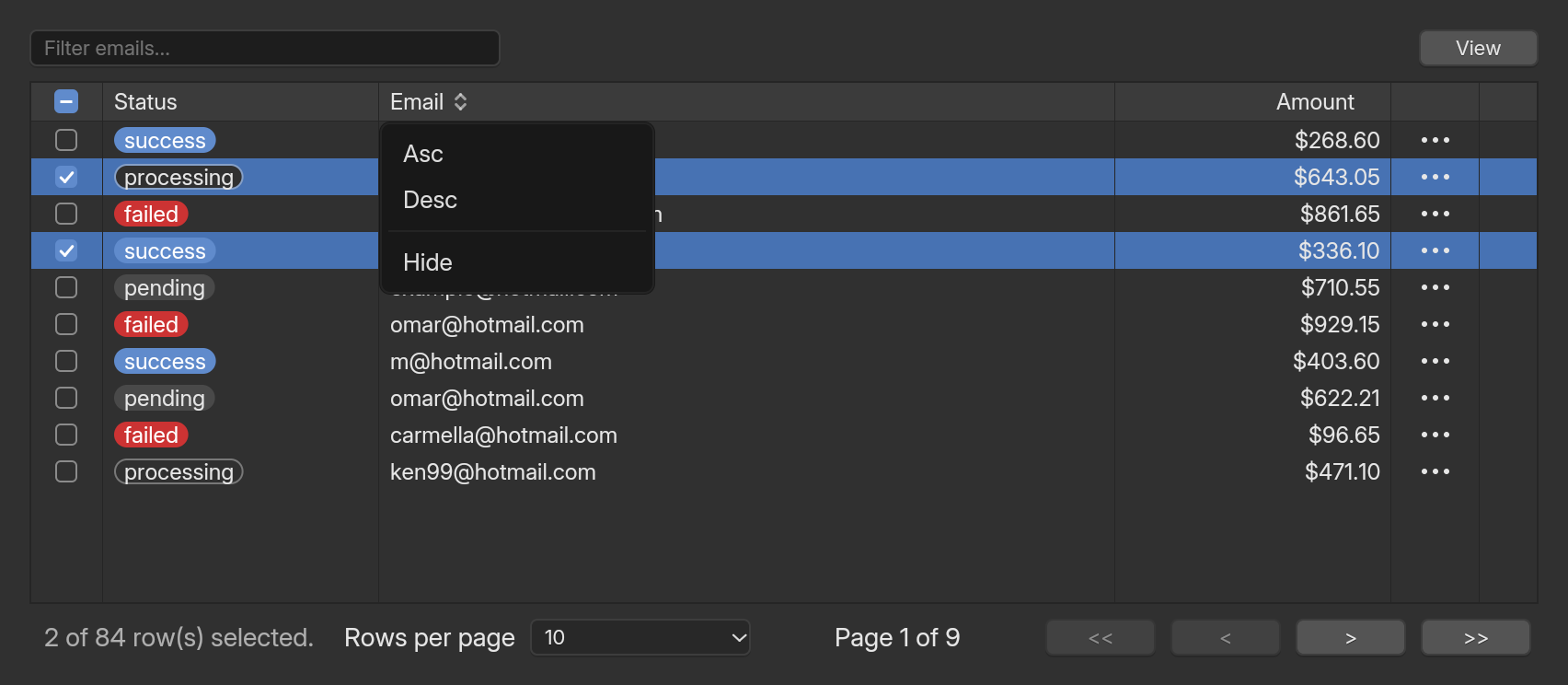
If you know shadcn/ui’s Data Table, you already know this one. DataTable takes columns and data, keeps TanStack Table’s state (sorting, filters, pagination, selection, column visibility), and draws a table that stays smooth at a million rows. The columns, the helper components and the callbacks have the names from the recipe.
examples/site_shadcn_table.rs).A payments table
Describe the row type once, write the columns, and put a DataTable in your view. This is the whole example behind the picture.
use std::sync::Arc;use blenderui::prelude::*;use blenderui::shadcn::*;
struct Payment { id: String, status: &'static str, email: String, amount: f64 }
// Rust has no reflection, so the row type lists its fields once: this is what// makes accessor_key("email") work.impl Record for Payment {    const FIELDS: &'static [&'static str] = &["id", "status", "email", "amount"];    fn field(&self, field: usize) -> Cell<'_> {        match field {            0 => Cell::Str(&self.id),            1 => Cell::Str(self.status),            2 => Cell::Str(&self.email),            _ => Cell::F64(self.amount, 2),        }    }}
fn columns() -> Arc<[ColumnDef<Payment>]> {    vec![        select_column(),        ColumnDef::accessor_key("status").header("Status").badge(|s| match s {            "success" => BadgeVariant::Default,            "failed" => BadgeVariant::Destructive,            _ => BadgeVariant::Secondary,        }),        ColumnDef::accessor_key("email").header(Header::menu("Email")).size(250.0),        ColumnDef::accessor_key("amount").header("Amount").meta(ColumnMeta::right().usd()),        actions_column(),    ]    .into()}
struct Page { columns: Arc<[ColumnDef<Payment>]>, data: Arc<[Payment]> }
impl Render for Page {    fn render(&mut self, _: &mut Window, _: &mut Context<Self>) -> impl IntoElement {        let (columns, data) = (self.columns.clone(), self.data.clone());        rsx! {            <DataTable columns={columns} data={data} filter_column="email" h={px(380.0)} />        }    }}
<DataTable ... /> is a component like any other. A missing columns or data is the usual “a required prop is missing” compile error.
use std::sync::Arc;use blenderui::prelude::*;use blenderui::shadcn::*;
// Payment, its Record impl and columns() are the same as in the rsx! tab.
struct Page { columns: Arc<[ColumnDef<Payment>]>, data: Arc<[Payment]> }
impl Render for Page {    fn render(&mut self, _: &mut Window, _: &mut Context<Self>) -> impl IntoElement {        DataTable::new(self.columns.clone(), self.data.clone())            .filter_column("email")            .h(px(380.0))    }}
DataTable is a builder: columns and data come first, every other prop is a method, and the Tailwind-style methods (h, w, p_4 …) work on it too.
columns and data are compared by identity, the way TanStack expects memoized references: an Arc that you clone is the same table, a fresh Vec is new data and the table sorts it again. Build them once (a field of your view, or use_memo) and pass them on every render.
The recipe, name by name
| shadcn / TanStack | Rust |
|---|---|
ColumnDef<TData> |
ColumnDef<T> |
accessorKey: "email" |
ColumnDef::accessor_key("email") (the row type implements Record) |
accessorFn, id |
ColumnDef::accessor_fn("id", |row| Cell::Str(&row.email)), .id("...") |
header: "Email" |
.header("Email") |
header: ({ column }) => <DataTableColumnHeader /> |
.header(Header::menu("Email")), with the DataTableColumnHeader menu |
cell: ({ row }) => <JSX /> |
.cell(CellRender::..), .badge(..), .meta(..) (typed cells, see below) |
enableSorting, enableHiding |
.enable_sorting(bool), .enable_hiding(bool) |
size, minSize, maxSize |
.size(px), .min_size(px), .max_size(px) |
meta |
.meta(ColumnMeta): alignment, number format, pinning |
select and actions columns |
select_column(), actions_column() |
useReactTable({ data, columns }) |
use_table() and DataTable |
<DataTable columns data /> |
<DataTable columns={..} data={..} />, DataTable::new(columns, data) |
state.sorting, onSortingChange |
.sorting(SortingState), .on_sorting_change(|s| ..) |
state.columnFilters, onColumnFiltersChange |
.column_filters(..), .on_column_filters_change(..) |
state.globalFilter, onGlobalFilterChange |
.global_filter(..), .on_global_filter_change(..) |
state.columnVisibility, onColumnVisibilityChange |
.column_visibility(..), .on_column_visibility_change(..) |
state.rowSelection, onRowSelectionChange |
.row_selection(..), .on_row_selection_change(..) |
state.pagination, onPaginationChange |
.pagination(PaginationState { page_index, page_size }), .on_pagination_change(..) |
initialState |
.initial_state(TableState) |
getCoreRowModel() |
Table::core_row_model() |
getFilteredRowModel() |
Table::filtered_row_model() |
getSortedRowModel() |
Table::sorted_row_model() |
getPaginationRowModel() |
Table::row_model(), switched on by .enable_pagination(true) (the default) |
table.setPageIndex, nextPage, previousPage, setPageSize |
the same names on TableHandle (table.next_page(cx)) |
table.getPageCount(), getCanNextPage() |
table.page_count(), table.can_next_page() |
column.setFilterValue(v) |
table.set_column_filter_value("email", v, cx) |
column.toggleSorting(desc) |
table.toggle_column_sorting("email", Some(desc), cx) |
column.toggleVisibility(v) |
table.toggle_column_visibility("email", Some(v), cx) |
table.toggleAllPageRowsSelected(v) |
table.toggle_all_page_rows_selected(v, cx) |
<DataTablePagination table={table} /> |
<DataTablePagination table={table} /> |
<DataTableViewOptions table={table} /> |
<DataTableViewOptions table={table} /> |
the toolbar with the filter Input |
<DataTableToolbar table={table} filter_column="email" />, or filter_column on DataTable |
flexRender |
none: there is no element to render (see below) |
Typed cells instead of JSX
The table is fast because it paints the cells in view straight from your data: there is no element per cell, a steady frame allocates nothing, and a million rows cost what a screenful does. shadcn’s cell: ({ row }) => <Badge>...</Badge> builds an element per cell, which is exactly what this table avoids. So a cell is a typed kind the table knows how to paint:
CellRender |
Looks like | The cell value |
|---|---|---|
Text (the default) |
the text, left, centered or right aligned | any Cell; numbers can be formatted with ColumnMeta::usd() or a NumberFormat (prefix, suffix, thousands grouping) |
Checkbox |
a Blender checkbox | a non-zero number is checked; select_column() reads the table’s row selection |
Badge |
a pill, as shadcn’s Badge | the text; .badge(|text| BadgeVariant::..) picks Default, Secondary, Destructive or Outline |
Progress |
a bar | a number from 0 to 100 |
Actions |
three dots, as the “more” button | none; a click calls on_row_action(index) with the row’s index in your data |
That covers the cells of the recipe: the checkbox, the status badge, the formatted amount and the row-actions button. flexRender has no equivalent for the same reason, so headers are typed too: Header::Text, Header::menu(title) (the sortable header with a menu) and the select-all checkbox of select_column().
State: uncontrolled, or controlled by you
Every piece of state works as in TanStack. Give nothing and the table keeps it. Give initial_state to choose where it starts. Give a value (.sorting(..)) and the field is controlled: the table only reports a change through its on_..._change callback and shows what you pass back.
#[component]fn payments_table() { let sorting = use_signal(SortingState::new()); rsx! { <DataTable columns={columns()} data={data()} sorting={sorting.get()} on_sorting_change={move |s: &SortingState| sorting.set(s.clone())} /> }}DataTable::new(self.columns.clone(), self.data.clone()) .sorting(self.sorting.clone()) .on_sorting_change(move |s| println!("sorting is now {s:?}"))A controlled field that you never update simply never changes, which is also how you lock a table to one sort order. The callbacks are called after the change, outside the table, so they can read the table’s handle.
Helper components
The helpers take a TableHandle, which use_table() returns (useReactTable’s result). Pass the same handle to DataTable and to any helper, and they can sit anywhere in the page:
#[component]fn payments_table() { let table = use_table(); rsx! { <DataTableToolbar table={table} filter_column="email" /> <DataTable table={table} columns={columns()} data={data()} toolbar={false} enable_pagination={false} /> <DataTablePagination table={table} page_sizes={vec![10, 25, 50]} /> }}DataTableColumnHeaderis the menu of a sortable header (Asc, Desc, Hide).DataTableopens it under a header made withHeader::menu(..).DataTablePaginationhas “Rows per page”, “Page x of y”, the four page buttons and “N of M row(s) selected.”.DataTableViewOptionsis the “View” button with a check per column that can be hidden.DataTableToolbaris a text field forcolumn.setFilterValue(or the global filter without a column) and the view options.
Outside a component, the handle’s methods do what TanStack’s table methods do: table.next_page(cx), table.set_column_filter_value("email", "ada", cx), table.toggle_all_rows_selected(true, cx), and table.snapshot() for what the table shows.
Row models and the core
The logic is not in the element. blenderui_table::tanstack has Table<T>, ColumnDef<T> and the state types in the dependency-free table core, so another adapter can reuse them; the components in this page are blenderui’s. Table<T> keeps the four row models as lists of row numbers (Blender’s index mask) instead of copies: sorting a million rows uses the typed keys of the table core, filtering is a pass over the cells’ text, and a page is a slice. The headless tests drive a million-row table through sorting and paging without drawing anything.
How fast it is
Writing the table through ColumnDef and Table<T> costs a little more per frame than the delegate API, and it still paints a million rows in about a millisecond and a half. The columns are read through the closures you gave, the badge, checkbox and progress cells are painted from the same typed values, and a steady frame allocates nothing in its own drawing.
shadcn Data Table: scroll frame, 1,000,000 rows x 20 columns
Whole frame, 900x500 window, software raster, median of 3 to 5 runs
Lower is better
1.5 msper scrolled frame through ColumnDef and Table
- DataTablethe delegate API1.26 ms
- shadcn Table<T>ColumnDef, typed cells1.53 ms
Open benchClose bench
| DataTable before this change | DataTable after | shadcn Table<T>, typed cells | |
|---|---|---|---|
| Runs (median of) | 5 | 5 | 3 |
| Build | 0.10 ms | 0.10 ms | 1.6 ms |
| First frame | 6.7 ms | 7.0 ms | 6.9 ms |
| Scroll frame | 1.39 ms | 1.26 ms | 1.53 ms |
| Heap allocations per frame (whole pipeline) | 48 | 48 | 48 |
| Allocations in the table's own drawing | 0 | 0 | 0 |
| Memory added (working set) | 17.2 MB | 17.3 MB | 24.1 MB |
| Sort 1,000,000 rows by a column (header click, includes the repaint) | 25.5 ms | 24.5 ms | 27.6 ms |
Both DataTable columns are the same benchmark (the painted DataTable of the delegate API): before is the commit that precedes this change, built in a separate worktree, run alternately with the current build on the same machine; the difference is noise. The last column is the same table written with shadcn's ColumnDef and Table: a checkbox column, a dollar column and a progress column among the numbers, rows held as 4-byte row numbers whose cells are computed. Its extra build time is creating the one million row values and the row model; its extra memory is the data and the row model (a list of row numbers). The allocation counts come from a counting global allocator; unit tests assert that the table's own drawing allocates nothing in steady state, for both. Not measured: other machines, the real GPU path.
Source: bindings/rust/blenderui/examples/bench_table.rs · Ryzen 7 5800U laptop, Windows 11, on AC power
The 1,000,000 x 20 table of Data tables, written with shadcn’s ColumnDef and Table (a checkbox column, a dollar column and a progress column among the numbers), measured by examples/bench_table.rs. The delegate API’s number is also measured before and after this change: the layer adds no cost to the table that was already there.
Limitations
- Cells are typed, not JSX. See above. This is the price of the speed; there is no
flexRender. - Filtering is
includesString. A column filter and the global filter keep the rows whose displayed text contains the value, ignoring case. There are no custom filter functions, faceted filters or range filters. - A header click cycles ascending, descending, none for one column.
sortingcan hold several rules, and they all apply (the first is the most significant), but there is no shift-click to add one. Numbers do not start descending, as TanStack’sautodoes. - A click on a row does not select it. Selection is the checkbox column, as in the recipe. The selected rows are highlighted in Blender’s selection color.
- The row-actions button reports a click and shows nothing. Show your own menu from
on_row_action. - Rows are identified by their index in the data (
getRowIdis not supported), so a selection follows the index, not a key. - Not built: row expansion, grouping, column ordering and column sizing as table state (dragging a header border resizes, but nothing reports it as state), faceted values, and server-side (
manual*) pagination, sorting and filtering in theDataTablecomponent. TheTableOptionsof the core has themanualswitches. - A hidden column forgets a width you dragged it to, and shows at its
sizeagain. - Icons are text: the menus say Asc, Desc and Hide and the page buttons are
<<,<,>and>>. TableHandlecalls do nothing before the table’s first frame. An unmountedDataTableleaves its state entity until the window closes.
Next steps
Last updated